


Word Search Solitaire
4.9493.00 Reviews
App Specs
- Version
- 1.80.0
- Updated On
- License
- Free
- Downloads
- 100,000+
- Developer
- PlaySimple Games
- Categories
- Word
- Platform
- Android
Screenshots
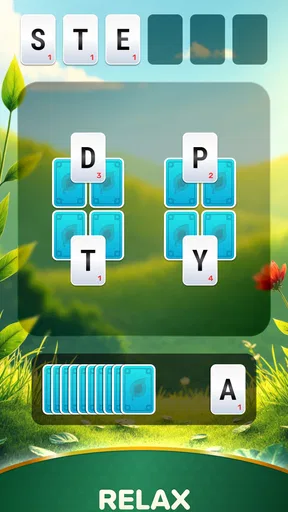
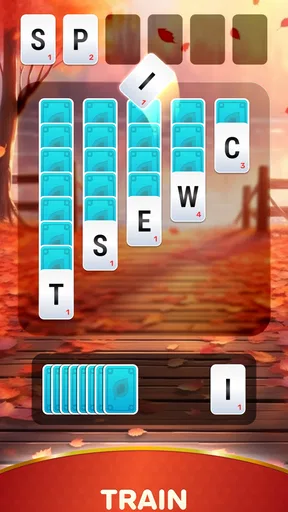
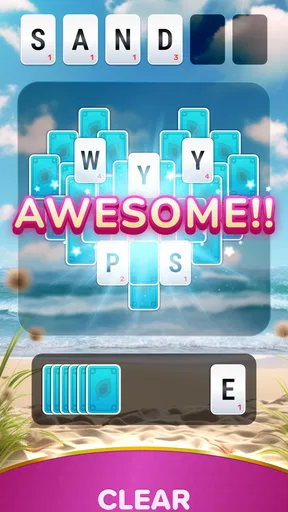
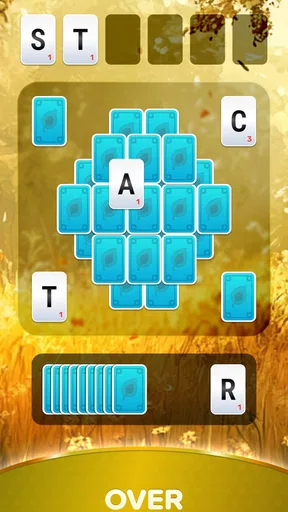
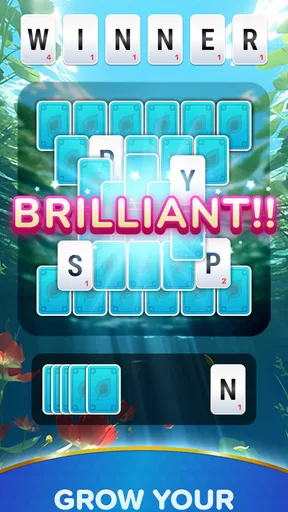
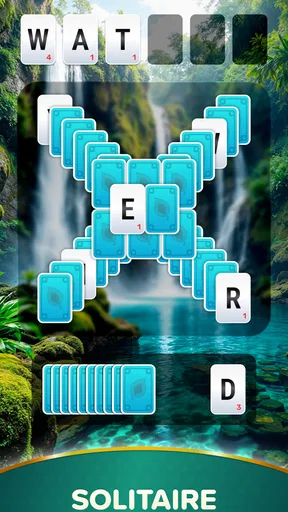
 Analysis by AppCompare
I tend to reach for a word puzzle when I have a few spare minutes, but many word searches feel like little more than scanning a grid. Word Search Solitaire aims for a different rhythm by mixing word-finding with solitaire-style planning. That combination gives a familiar format an extra decision-making layer, though it also means the game is best suited to players who enjoy thinking a move ahead rather than simply circling words.
Getting Started with Word Search Solitaire
Word Search Solitaire is a free word game from PlaySimple Games. It has an average rating of 4.8 from around five thousand ratings, and it has passed one hundred thousand installs. The game is rated for everyone, so it can suit a broad range of ages, although younger players may still appreciate some help with unfamiliar words or the strategic parts of a puzzle. Its current version is 1.72.0, and it runs on Android 7.0 or later.
The basic appeal is easy to understand: spot words, then consider how clearing them affects the rest of the board. If you are used to conventional word searches, the extra planning is the main adjustment. I would take a moment to understand the tutorial rather than tapping through it, because knowing what counts as a useful move can make early puzzles feel much less trial-and-error. If a level feels confusing, pausing to inspect the available letters is more helpful than trying to rush through several possible words.
Where Players Can Get Stuck
The word-search side is familiar, but the solitaire framing changes how I approach each choice. Finding a valid word is not always the same as making the best move: a word that looks obvious may not help clear the board as efficiently as another option. That is where the game asks for a little patience. I find it useful to scan the full grid before committing, especially when several words seem available, and to consider whether clearing one area will make later choices easier or harder.
The difficulty can rise as you progress, so a puzzle that seemed straightforward at first may eventually require more deliberate thinking. When I stall, I try changing my search pattern instead of repeatedly scanning the same rows: look vertically, diagonally, and in less familiar directions, then reassess the board. The goal is not merely to find a word quickly but to avoid overlooking a better sequence. That distinction is what gives the solitaire element a purpose, but it may frustrate anyone who wants a simple, no-planning word hunt.
Setup Checks and a Comfortable Routine
The game is free to download, with in-app purchases priced from $2.99 to $79.99 per item. I would treat optional purchases as a choice rather than a requirement and decide for myself whether any paid item is worth it before buying. If you are setting it up for a child or sharing a device, it is sensible to check purchase controls on the device first. That is a general precaution for games with in-app purchases, not a reason to assume spending is necessary to enjoy the puzzles.
A useful routine is to play one level when you have a short break, then leave longer sessions for moments when you can focus on the board. Daily challenges, as described in the game, can give a brief session a clear endpoint; they may suit a commute wait or a quiet pause between tasks better than starting a longer run. If you are playing while tired, take the puzzle at a slower pace. A quick scan can miss a word or lead to a move that makes the remaining board harder to read.
Worth Reading Before You Choose

EA SPORTS FC Mobile 26 Is a Bigger Football Game, but It Takes Time

Flipboard Shows What News Apps Must Do Beyond the Feed

Switching to Android Auto Means Rethinking Your Driving Routine

Google Calendar Makes a Crowded Week Easier to Manage

Ludo King Makes the Most of the Minutes Between Plans

Baby Panda World Brings Quick Play to Modern Phones, but Its Game Library Feels Busy
Recovering When a Session Goes Awry
If the game seems unresponsive, I would first try ordinary checks: make sure the device has enough charge, close and reopen the app, and confirm that the operating system meets the Android 7.0 minimum. If a level appears difficult rather than broken, go back to the grid and search methodically before assuming the game has stalled. Those steps are simple, but they help separate a momentary device issue from a puzzle that simply needs a fresh look.
For a more reliable play session, avoid switching rapidly between the game and other demanding apps on a device that is already struggling. If progress or a screen does not look as expected, restarting the app is a reasonable first step; I would not assume that reinstalling is harmless if I had unfinished progress. The same practical caution applies to purchases: review the item and its price carefully before confirming, especially if someone else uses the device.
How It Fits Beside Other Word Games
Compared with a classic word search, this game asks for more than spotting a hidden word: the solitaire influence makes board-clearing decisions part of the puzzle. That gives it more strategic texture than a straightforward grid, but it can feel slower if your main aim is to find words as quickly as possible. Compared with a conventional solitaire game, the vocabulary task is the point, so it is a better fit for someone who wants language play alongside planning rather than card-based pattern recognition.
It is particularly suitable for people who like word puzzles but sometimes find standard searches repetitive, or for players who want a small mental task that can fit into a spare moment. I would recommend a simpler word-search app instead if you want an instantly obvious goal with minimal decision-making. If you prefer a deep, extended strategy game, this one may also feel too light: its strength is the approachable mix, not a promise of lengthy tactical sessions.
What the Extras Add—and What They Don’t
The daily challenges can help turn the game into a small routine, while themes and backgrounds let you alter its appearance. I see those as useful touches around the central puzzle rather than the reason to play. A practical tip is to choose a visual style that keeps the letters easy for you to read; a decorative background is only a benefit if it does not distract from scanning the grid. If you mainly care about solving puzzles, the core word-and-board decisions matter more than customization.
Power-ups and bonus tiles are mentioned as part of the experience, but I would treat them as support for a puzzle rather than a substitute for looking carefully. If one appears, consider whether using it solves a real problem or whether a better word is still visible. That small pause can keep a helpful tool from becoming an automatic response. Players who prefer every challenge to depend only on their own unaided search may find these extras less appealing, while casual players may welcome a way to move past a stubborn moment.
Who Should Give It a Pass
I would skip this game if I wanted a completely passive distraction or a traditional word search with no added planning. The solitaire twist is not complicated to explain, but it changes the feel of each move and can make a quick puzzle take longer than expected. It may also be a poor match for someone who dislikes optional purchase prompts in free games, even though the basic download costs nothing. The listed purchase range is broad, so I would check each item rather than assume all options cost about the same.
For a household game, its everyone rating makes it broadly accessible, but that does not mean every child will find the strategic choices easy. I would let a younger player try a puzzle with an adult nearby if they are new to word games, then see whether the letter search is enjoyable or frustrating. For a solo player who likes quiet, focused breaks, the combination is more compelling: there is enough to think about without requiring a long session or a complicated setup.
The Gameplay Experience
The gameplay in Word Search Solitaire is both relaxing and challenging, striking a nice balance that keeps you hooked. You start with a grid filled with letters, and your goal is to form words by connecting letters in any direction. Sounds simple, right? Well, here’s where the solitaire twist comes in. You need to strategically clear the board, much like how you’d clear cards in solitaire.
Each level has its own unique challenges, and the difficulty ramps up just enough to keep things interesting. The app does a great job of introducing new mechanics and power-ups as you progress, ensuring that gameplay remains fresh and exciting. For instance, you might find bonus tiles that can really change the game when used effectively.
Features That Shine
One of the features I really enjoyed is the daily challenges. These are perfect for when you’ve only got a few minutes to spare but still want that puzzle-solving fix. They also offer a great way to earn extra rewards and climb the leaderboard, adding a competitive edge to the game.
The app also offers a variety of themes and backgrounds. You can customize your game’s appearance to match your mood, which is a nice touch. Who doesn’t love a bit of personalization, right?
- Intuitive interface
- Engaging mix of word search and solitaire
- Challenging levels with strategic depth
- Daily challenges for quick play
- Customizable themes
Why You Should Try It
If you’re like me and enjoy games that are both relaxing and mentally stimulating, then Word Search Solitaire is definitely worth downloading. It’s the kind of game that you can play in short bursts or for longer sessions, depending on your schedule. Plus, the sense of satisfaction from completing a particularly tough level is unbeatable.
The app is free to download with optional in-game purchases, but I found that you can enjoy a lot without spending a dime. However, if you want to enhance your experience with more themes or power-ups, those options are available.
Final Thoughts
All in all, Word Search Solitaire offers a refreshing take on two beloved puzzle genres. It’s a game that’s easy to pick up but hard to put down, making it perfect for puzzle lovers of all ages. Whether you’re a fan of word games, solitaire, or just looking for something new to try, I highly recommend giving it a go.
So, why not head over to the app store, download Word Search Solitaire, and start playing today? Happy gaming!
Pros
- Engaging word puzzles keep players entertained.
- Simple interface makes it easy to navigate.
- Daily challenges offer fresh content regularly.
- Offline mode available for uninterrupted play.
- Boosts vocabulary and cognitive skills.
Cons
- In-app ads can be distracting during play.
- Limited customization options for themes.
- No multiplayer mode for competitive play.
- Some puzzles may feel repetitive over time.
- Requires occasional internet for updates.
FAQs for Word Search Solitaire
What is Word Search Solitaire?
Word Search Solitaire is a unique puzzle game that combines the classic elements of word search puzzles with the strategic aspects of solitaire. Players must find and connect letters to form words, which helps clear the board. It's a great brain exercise, enhancing vocabulary and strategic thinking.
Is Word Search Solitaire free to download?
Yes, Word Search Solitaire is free to download on both Android and iOS platforms. The game offers in-app purchases that allow players to unlock additional features or remove ads. However, the core gameplay experience is accessible without any purchases, making it enjoyable for all users.
Does Word Search Solitaire require an internet connection?
No, Word Search Solitaire can be played offline, making it perfect for users who want to enjoy the game without worrying about data usage. However, some features, like daily challenges or leaderboards, might require an internet connection to function fully.
What are the main features of Word Search Solitaire?
The game includes a variety of features such as multiple difficulty levels, daily challenges, and themed puzzles. Players can also enjoy a seamless and intuitive interface, making it easy to navigate through different game modes. Additionally, the app offers hints and power-ups to assist players when they’re stuck.
Is Word Search Solitaire suitable for all ages?
Yes, Word Search Solitaire is designed to be family-friendly and suitable for players of all ages. Its simple mechanics and engaging puzzles make it accessible to both younger players looking to improve their vocabulary and older players interested in a relaxing yet challenging activity.


